
Chat with Duo!
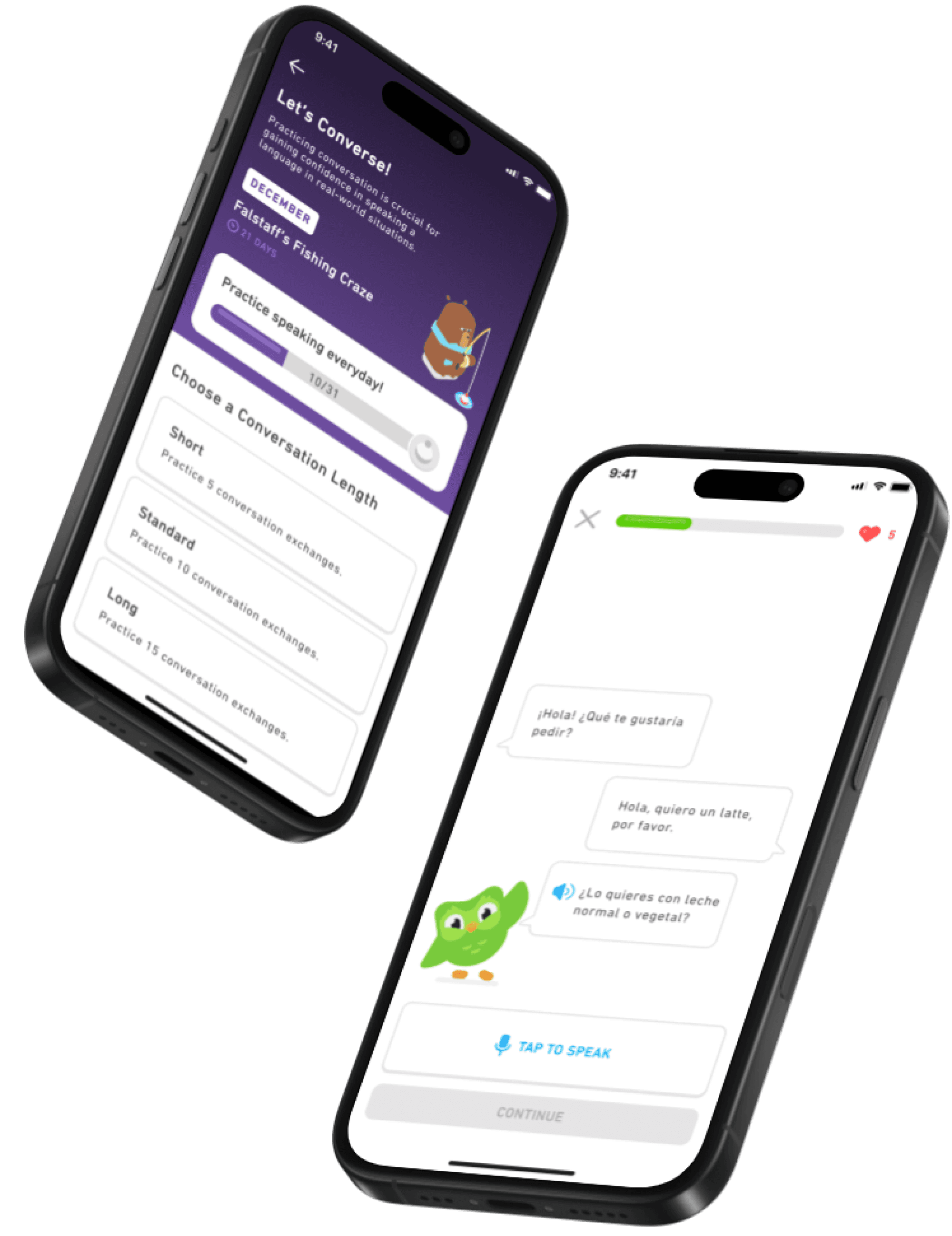
Designing a Duolingo mobile app feature that enables users to practice and improve their conversational language skills through interactive, AI-powered dialogue prompts. 'Chat with Duo!' simulates realistic conversations, helping language learners build confidence and gain practical experience for real-world interactions.
The Problem
Duolingo learners often are able to reach elementary proficiency but struggle to advance due to limited speaking and conversation practice. This gap often leads to a loss of motivation and eventual app abandonment, creating a need for a feature that enables real conversation practice—re-motivating users and encouraging continued use by building their confidence in speaking publicly.
My Role
Ideation, User Research, UX Design, Interaction Design, Prototyping, Usability Testing
Timeline
10/2024 - 12/2024
Tools
Figma, Figjam, Google Forms, Zoom
The Feature
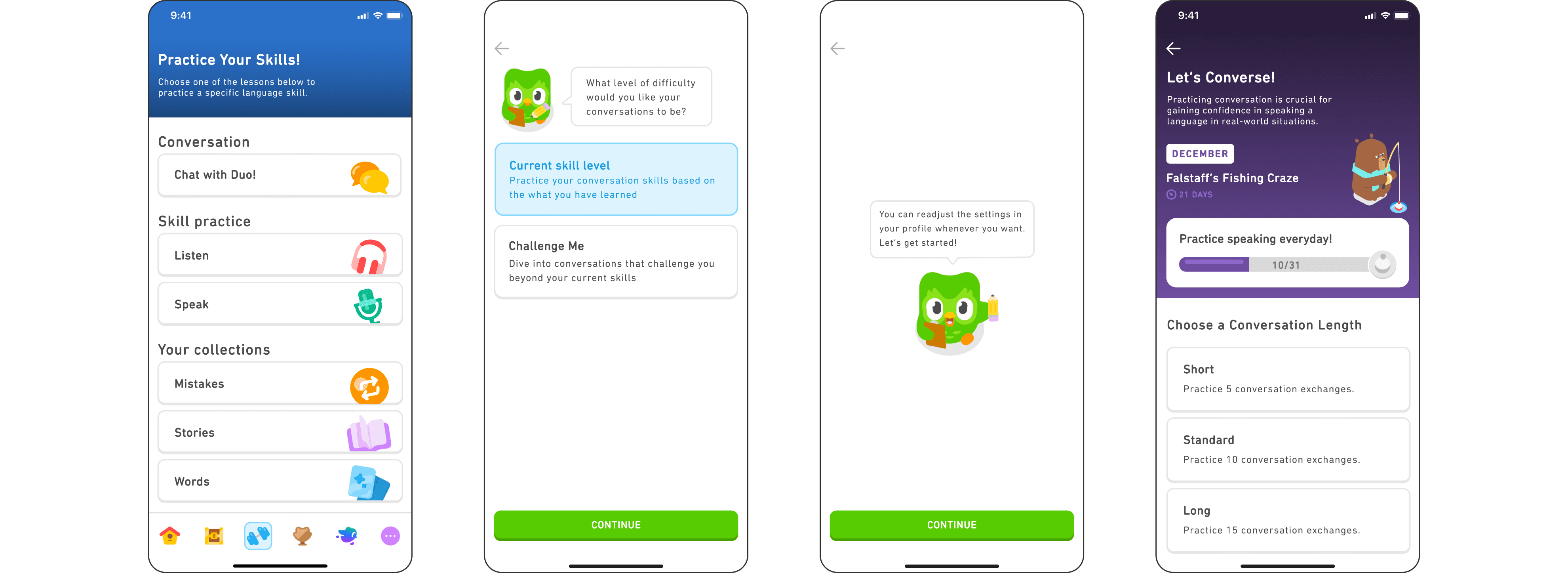
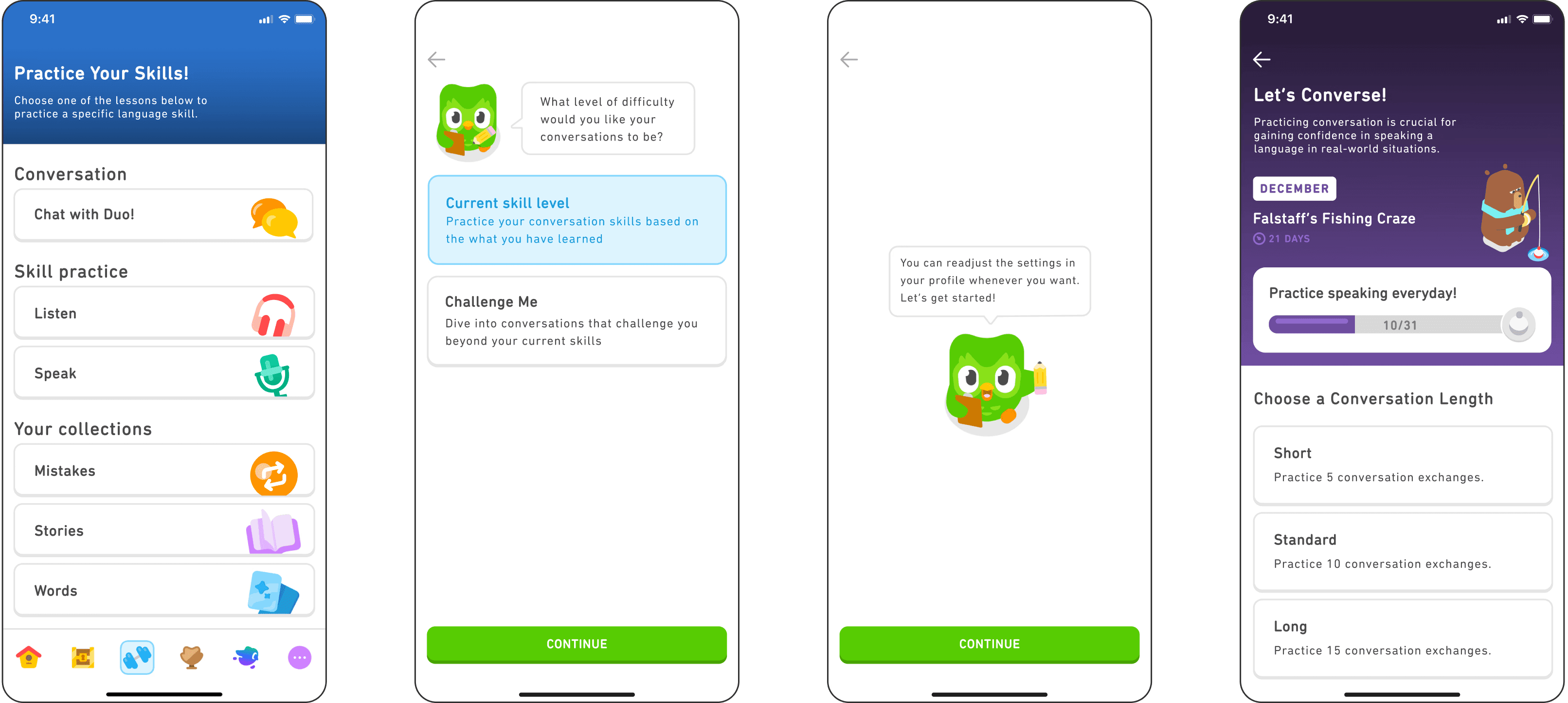
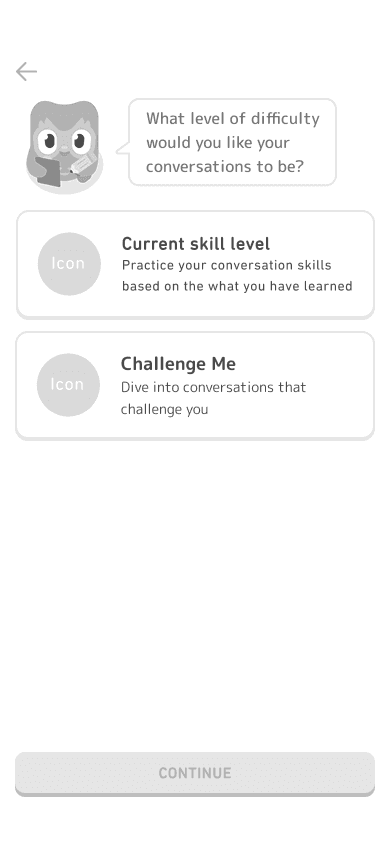
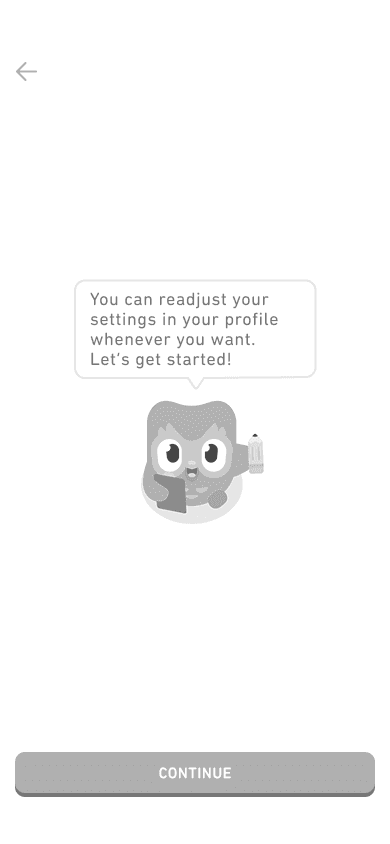
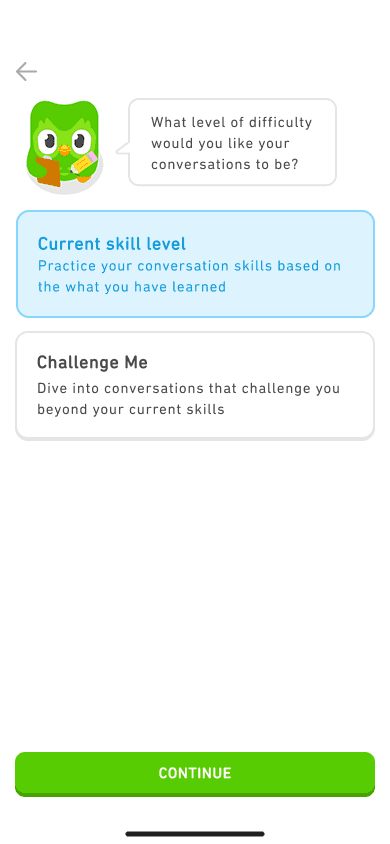
New users of the “Chat with Duo!” conversation feature are shown a one-time prompt that allows users to set the skill level of their future conversation sessions. Further changes can be made in user settings.
Working Through a Lesson
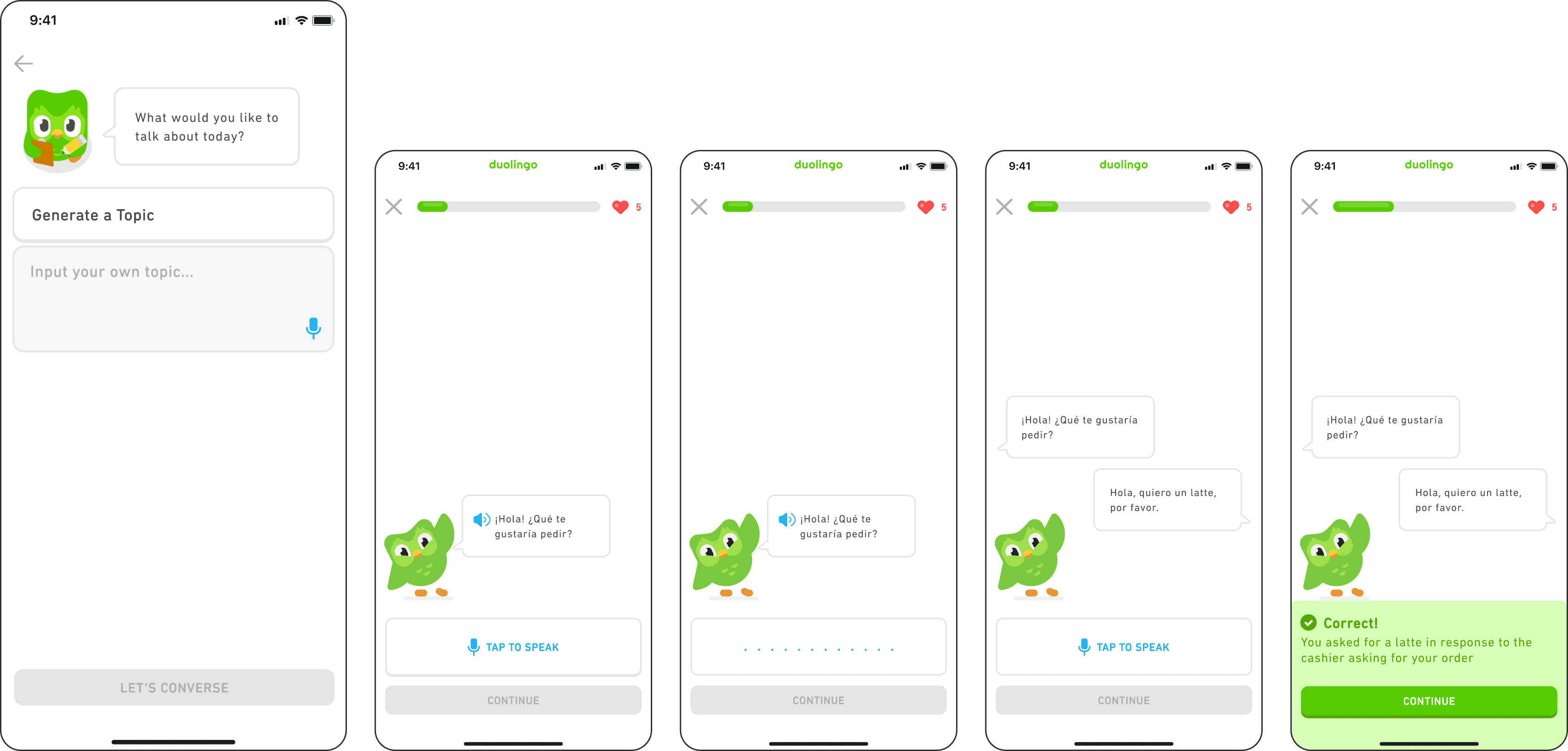
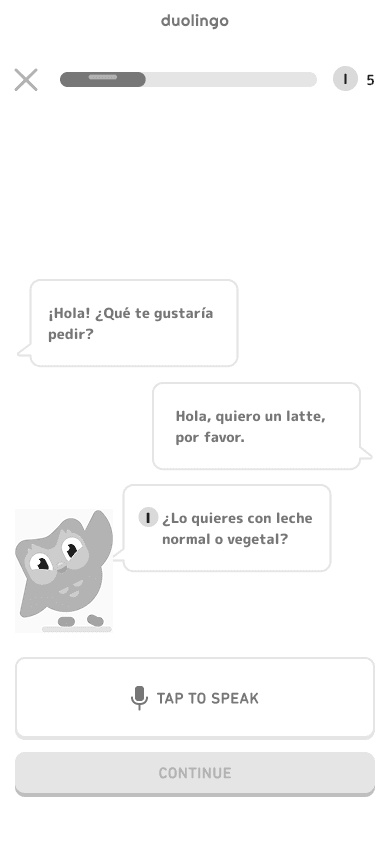
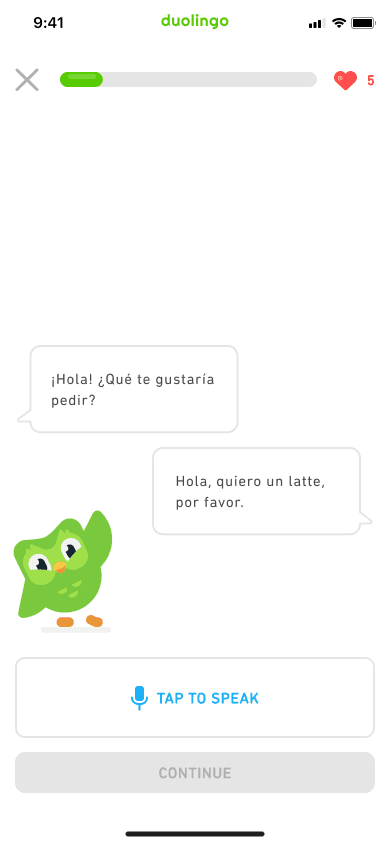
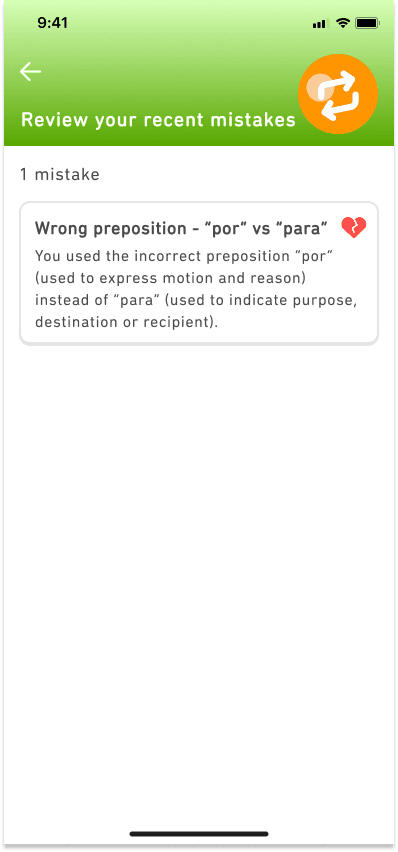
Through AI-powered dialogue, users can practice their listening and speaking skills using both visual and audio representations of conversations, providing flexible and accessible language learning for all proficiency levels.
Receiving Feedback
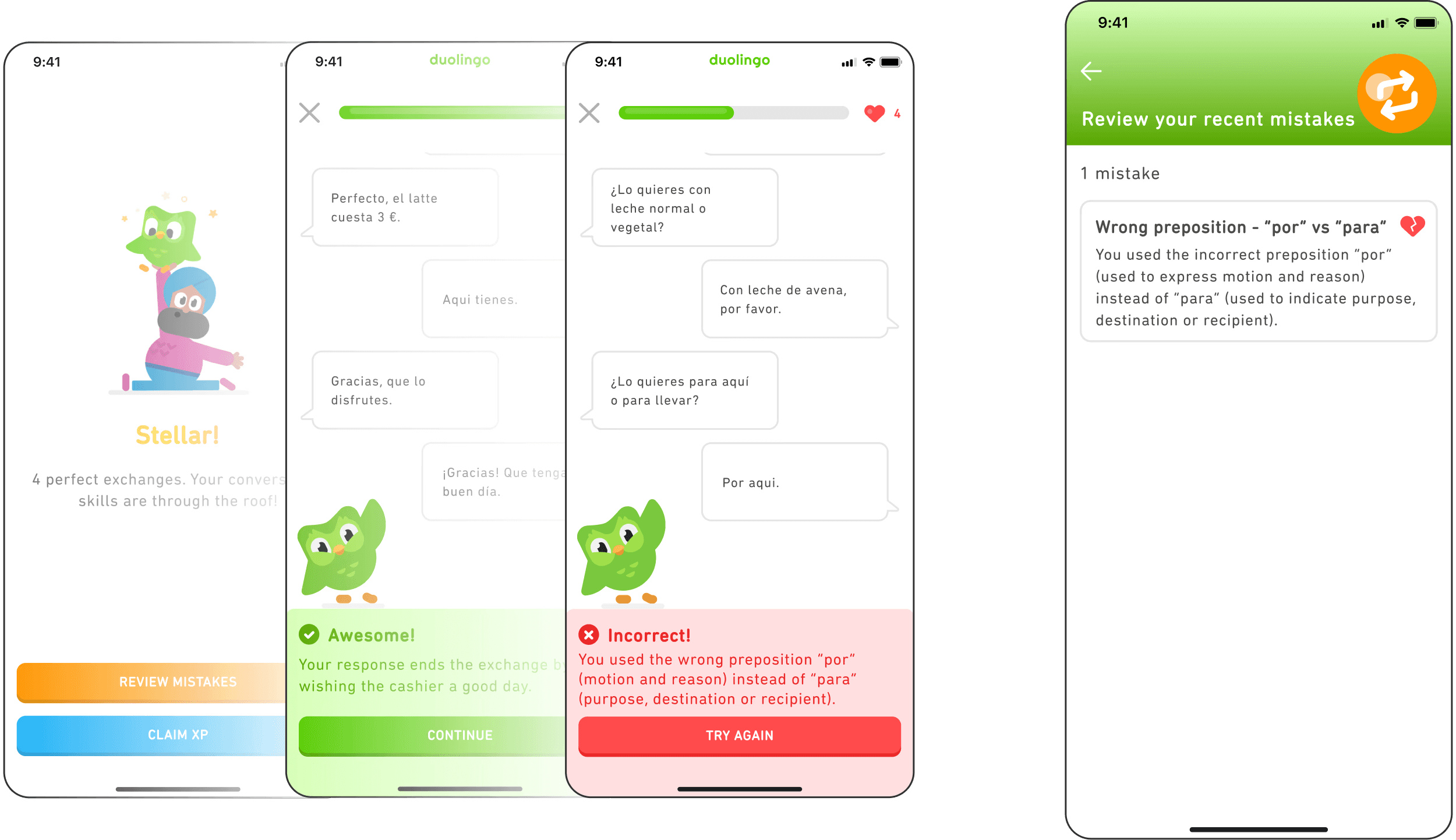
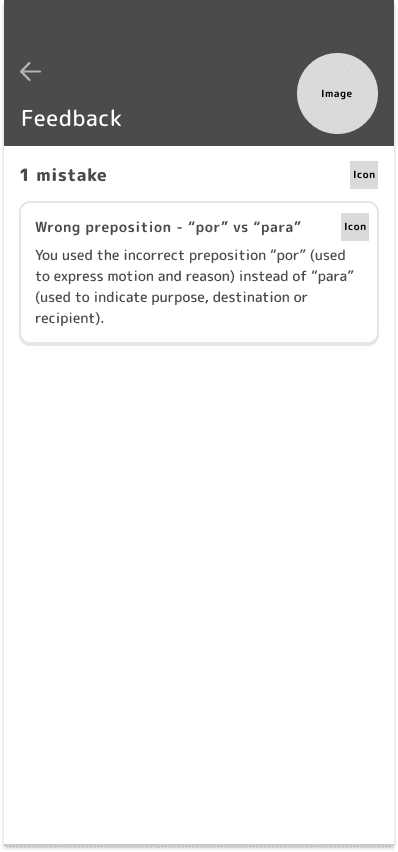
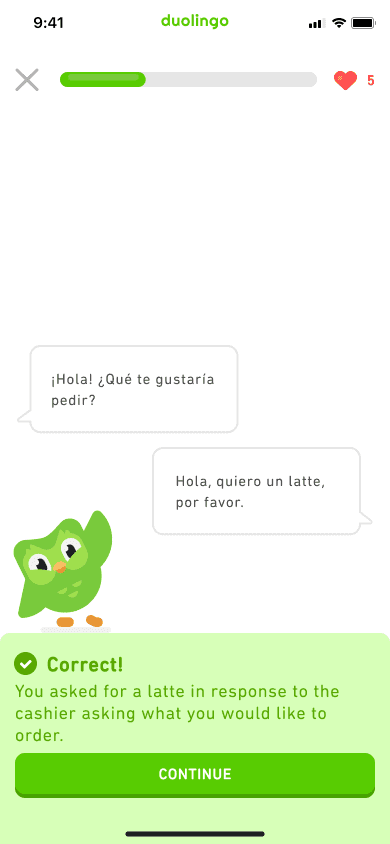
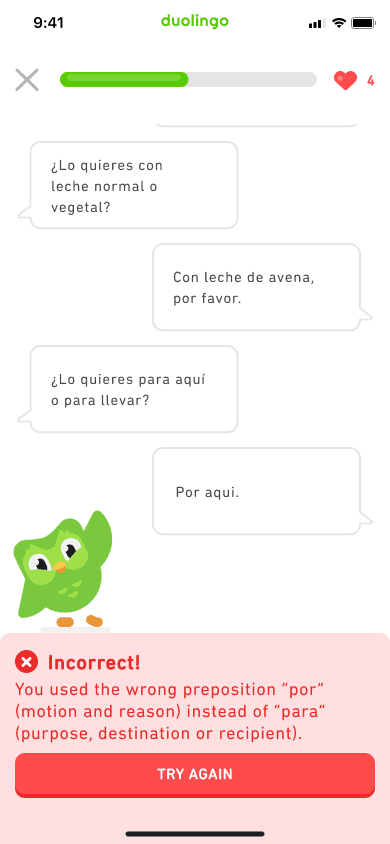
Users receive both immediate feedback during the lesson and more in-depth explanations at the end of each lesson to promote understanding and more efficient learning.
Research Objective
My goal for this project was to learn what areas of language learning Duolingo users think the app could improve upon so that we can design a feature that will enhance this area of their language learning experience.
Following the Design Thinking Process, I started investigating this problem by conducting competitive research to analyze existing language-learning platforms and current trends. I then proceeded by conducting a survey to provide insights into overall users’ experiences with the Duolingo app and interest in a conversation feature. Finally, I followed up with user interviews to get a deeper understanding of user pain points and needs.
Empathize
Define
Ideate
Prototype
Test
Research Methods

Competitive Research
To understand the market landscape of existing language learning platforms, I researched and conducted a SWOT analysis of 4 well-known platforms that were widely used and each had a unique approach to language learning. Here are some of the key highlights from my research:
Strengths
Weaknesses & Opportunities
Threats
Babbel
Provides live online learning classes
Sub-platforms cater to specific learning purposes
Dedicated and personalized review system for long-term memorization
Challenging for beginners or leisure language learners due to intensive learning requirements
Use of the Babbel platform requires payment, which may deter potential users
Other language-learning platforms provide more language options and content for each language.

Rosetta Stone
Offers cross-platform versions of their program
Gives users immediate feedback on pronunciation with live coaching from native speakers.
Reputable brand due to long-standing history
Repetitive and rigid lessons cause users to lose motivation and interest over time.
Failure to provide relevant cultural depictions
Teaches formal over informal speech
Other apps have created more innovative and gamified ways to learn which appeals to more users

Busuu
Created for language learning among employees
Personalized courses for specific businesses
Encourages collaborative learning with a community where users can practice with native speakers
Lacking in teaching vocabulary terms
Efficacy varies based on languages
Content is not engaging and lacking in entertainment value
Quality and content of lessons drop at higher levels of language proficiency compared to other language-learning platforms
Memrise
Self-set language levels = personalized study plans
Users can practice using native-speaker videos
AI language tutor helps users to practice speaking
Use of gamified elements, silly images and trending topics appeals to a wider audience.
Inconsistency in features available across different platforms
Insufficient lessons and practice with grammar, culture and writing
Lessons lack conversation-based verbal practice
Platform is based on user-created flash cards which does not suit all audiences or guarantee the quality and/or correctness of learning.

User Survey
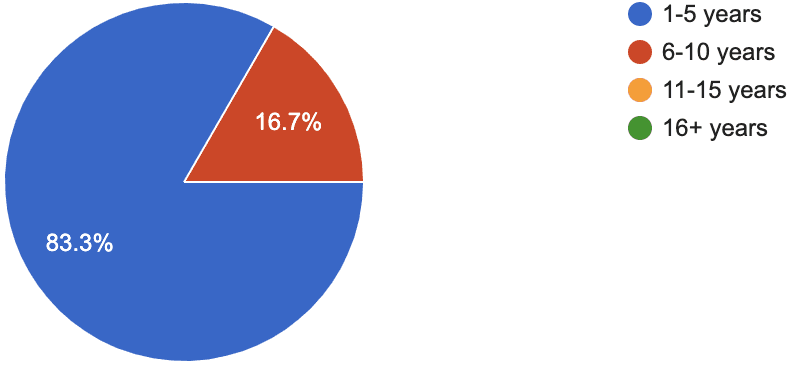
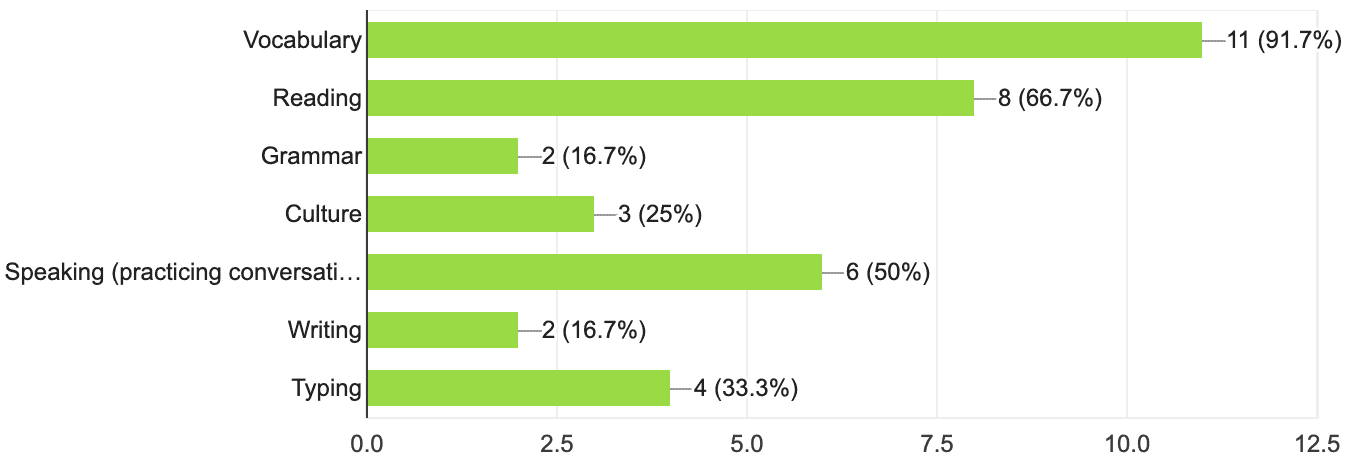
I then surveyed 12 Duolingo users to gather information on key demographics, gain insights into users’ experiences with general language learning and the app, understand how users wished their language learning could be improved, and survey interests on a conversation feature.
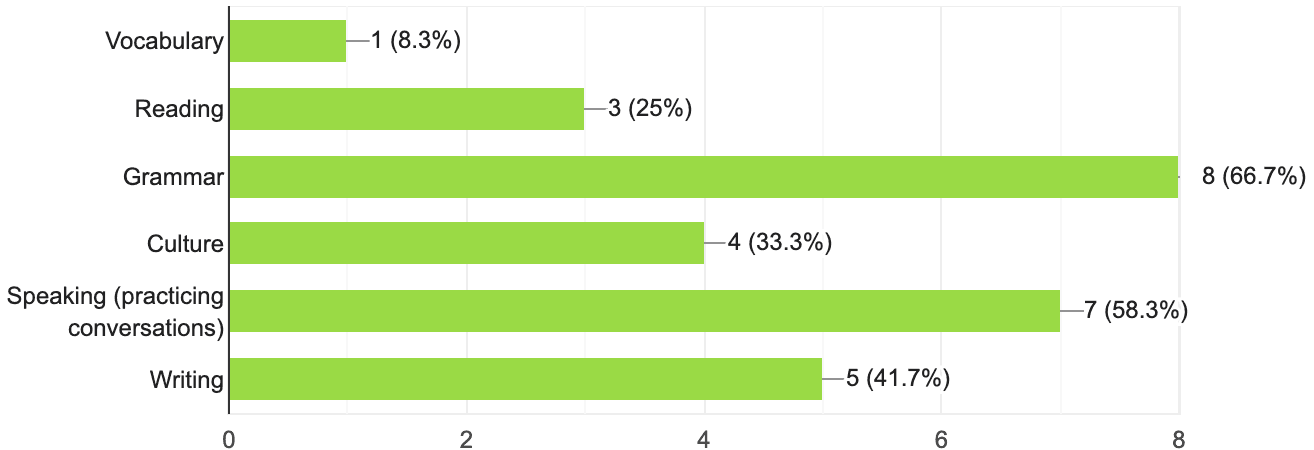
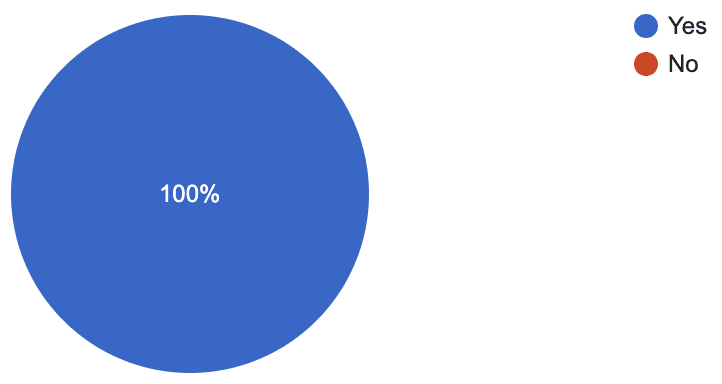
Here is a sample of some of the key survey questions that would help me determine my user interview participants and the topics of discussion during the user interviews:
How many years have you been using Duolingo?
Which areas of language learning has Duolingo helped you with?
Which areas of language learning could be improved in Duolingo?
Would you be interested in a feature where you could practice conversations on Duolingo?
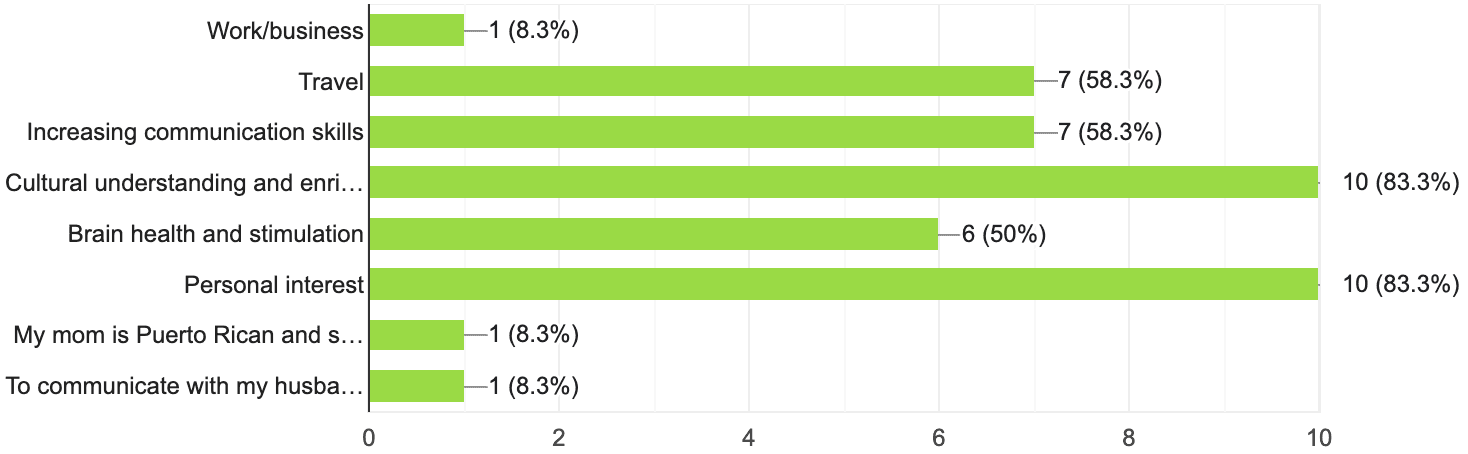
For what reason(s) are you learning a language on Duolingo?
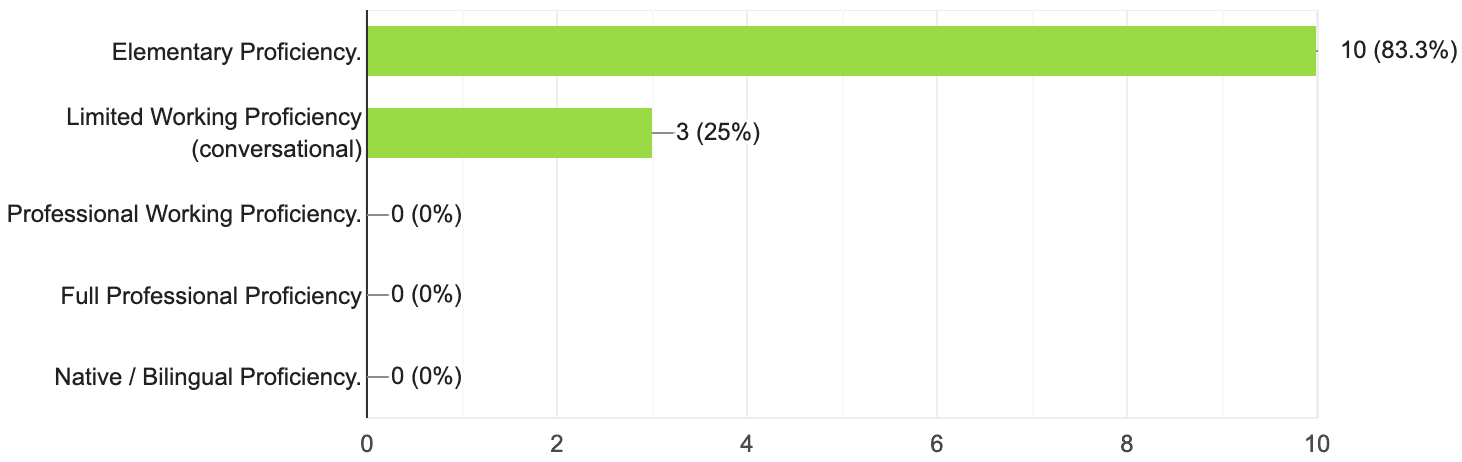
What level(s) of proficiency have you achieved in languages you learned on Duolingo?
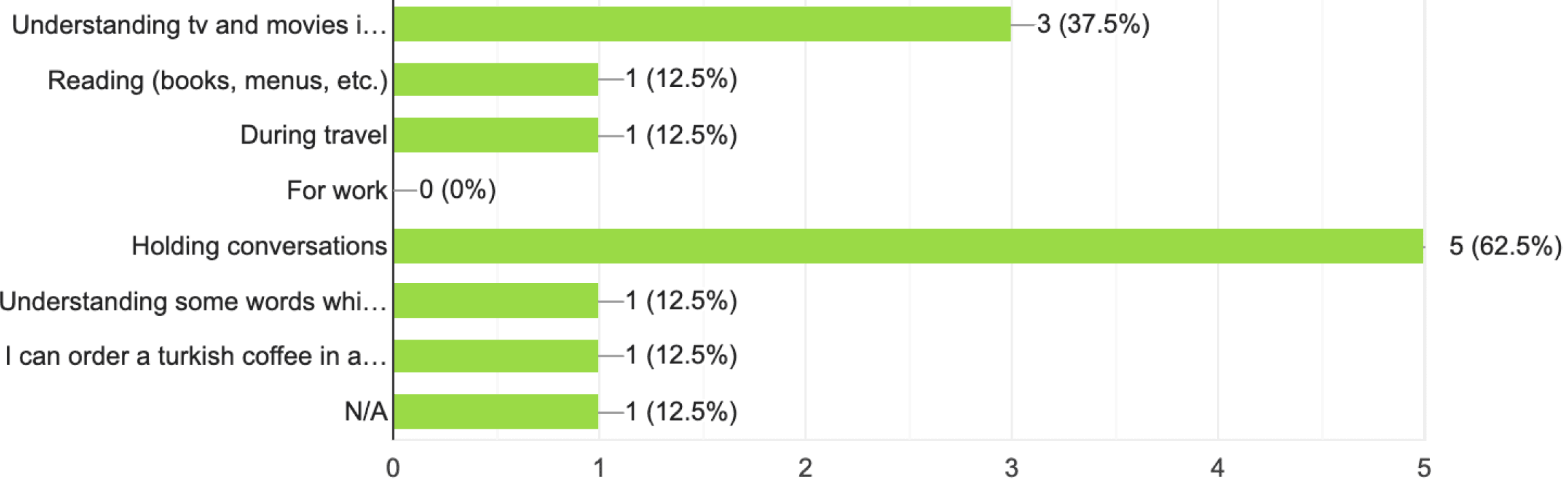
How have you been able to use the skills you learned in Duolingo?
Would you be interested in practicing holding conversations with AI or with real people?
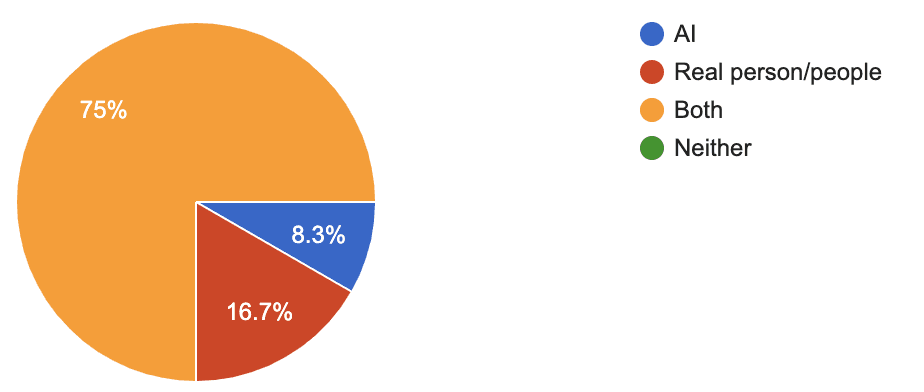
The results of the survey showed a large need and desire for a conversation feature as speaking was one of the most agreed-upon areas of language learning that Duolingo users felt could be improved upon and all survey participants showed interest in a conversation feature.

User Interviews
Based on my survey results, I was able to narrow down my choices to 5 user interview participants who had used Duolingo consistently for at least a couple of years yet differed in the reasons why they were learning a language so that I could obtain a broad scope of user experiences which I hoped would provide more insights into my interview findings.
My survey results also helped me to determine the major topics that I would cover during my interviews:
(1) Background on Language Learning
(2) Experiences using Duolingo
(3) Thoughts on a Conversation Feature
Here are some examples of interview questions that helped guide my conversation:
Background on Language Learning
Can you tell me about your overall experiences with language learning during your life?
Are there any specific motivations you have for learning the languages that you chose to learn?
If you are learning different languages, are there any differences in the ways you approach learning the languages?
Experiences Using Duolingo
Do you use Duolingo regularly? If so, how long would you say you spend on Duolingo each week?
Is there any reason why you chose the Duolingo application for language learning and not others?
In the survey, you wrote that you think ______ is an area of language learning that you think Duolingo can be improved upon. Can you elaborate about your experience with Duolingo in these two areas?
Thoughts on a Conversation Feature
What are your thoughts on conversation practice when learning a new language?
What are some of the biggest challenges you face when learning a new language, especially when it comes to speaking and conversation?
What do you think would help you feel more comfortable or confident practicing speaking in a new language?
How do you feel about a conversation feature that adapts to your skill level and learning goals?
With these main topics of conversation, I was able to get a deeper understanding into each language learner’s experience with the Duolingo app, the problems they encountered as a user, and their interests in a new conversation feature.
Information Consolidation
With the information from my user interviews, I created an affinity map to group key insights and determine common pain points. Here are the most commonly shared pain points among my interview participants:
There is a need for a conversation feature because it boosts confidence, allows users to practice pronunciation, and improves language fluency.
Current Duolingo lessons and practice sessions do not give enough feedback for users to learn from.
Practicing conversations is challenging due to difficulties in finding a practice partner.
User Personas
Based on my research findings, I created 2 user personas that reflected the goals, challenges, and needs of Duolingo users.
Persona 1
A passionate global journalist who uses his language skills to directly interview sources and connect with diverse audiences. Although Duolingo has helped him in learning new languages, he still struggles with learning relevant vocabulary for his work.
Persona 2
A young nurse who uses Duolingo to connect better with her family, patients, and her favorite shows. Although Duo has helped her improve, she struggles to use her language skills in public due to low confidence and lack of practice.
Throughout the rest of the project, these personas were used as references to make key design decisions based on real-life needs and expectations.
1
John Kovač

Age: 41
Job Title: Journalist
Status: Married, 2 children
Location: Washington D.C.
Character: The Explorer
Passionate
Empathetic
Curious
Adventurous
Influencers





Motivations
Feels motivated by a sense of achievement generated by visible improvements
Pays a monthly subscription and feels obligated to use it
"As a journalist, I travel around the world to meet and interview people in need. Being able to speak in another’s native language helps to convey my authentic and sincere desire to help others, and the trust I develop between all the people I meet is crucial to uncovering the truth and understanding their concerns."
Biography
John Kovač is a global journalist who dedicates his life to uncovering and reporting on international news such as human rights and climate change issues occurring around the world. With a career that frequently requires him to travel to various countries and interview people of all backgrounds on sensitive issues, he has found that being able to communicate with people in their native language has been the most effective way to develop trust and form lasting relationships. To improve his language skills, he dedicates any free time he has to language learning on the Duolingo app which has provided him with a convenient and engaging way to learn languages on his own. However, although Duolingo has been helpful for him to read the languages he practices, he struggles to learn the relevant terms for issues that he works on and use his language skills in conversation.
Goals
To use Duolingo to learn various languages
To feel comfortable speaking in different languages through practice
To be able to talk about complex issues to native speakers
To converse naturally/colloquially with native speakers
To learn how to speak formally with government/political figures.
Pain Points
Lesson pacing in Duolingo is too slow for language skills to be applicable.
Lessons topics aren't relevant to the issues that John needs to be able to talk about.
Does not know if his pronunciation is correct when speaking during lessons.
Cannot find people to practice formal and informal language with.
Needs
A feature that lets him to practice speaking languages
A feature that will let him choose specific topics to converse about.
A feature that will give him feedback in the form of in-depth analysis so that he can use it to study.
A feature that will challenge his speaking skills to mimic his experience when speaking with native speakers during his travels.
2
Sumayah Gaddafi

Age: 27
Job Title: Registered Nurse
Status: Single
Location: Boston
Character: The Caregiver
Genuine
Open-minded
Sociable
Kind-hearted
Influencers





Motivations
Gamified features on Duolingo make language learning interesting
Friend quests and features that promote interactions with others
"I love learning about different countries’ history and culture, and learning their language is a huge part to better understanding them.”
Biography
Sumayah Gaddafi is a compassionate RN who excels at her job due to her good relationships with both her coworkers and patients. Due to her interests, work, and family, Sumayah is practicing multiple languages through the Duolingo app. Currently, she is practicing Spanish with Duolingo due to the growing number of Hispanic patients at work who struggle with speaking English. In addition, she is also learning Arabic to feel closer to her roots while also being able to converse better with her extended family, and Korean due to her love for Kpop and Kdramas. Using Duolingo, Sumayah has already learned the different alphabet systems and basic vocabulary and grammar structures of each language but has been struggling with using her language skills in conversation due to her low confidence and lack of practice in speaking publicly. For this reason, she finds that she is slowly losing motivation to use the app.
Goals
Wants to feel more confident with her Arabic to better communicate and strengthen her relationship with her extended family.
Wants to be able to speak Spanish to communicate better with her Hispanic patients.
Wants to learn Korean to understand her favorite music and shows.
Pain Points
Has learned the basic lessons in certain languages but has reached a roadblock in getting to conversation fluency
Losing motivation to keep up her language learning and streak on Duolingo
Afraid to speak foreign languages in public
Low confidence due to inability to find other language speakers to practice with
Needs
A feature that will help build the user’s confidence when conversing in another language
A feature that lets users to practice a variety of topics
A feature that will give instant feedback so the user can immediately fix their mistakes
A feature that is gamified or give rewards so that the user will stay motivated to use it
A feature that adjusts to a user's skill level
Design Ideation
Venn Diagram
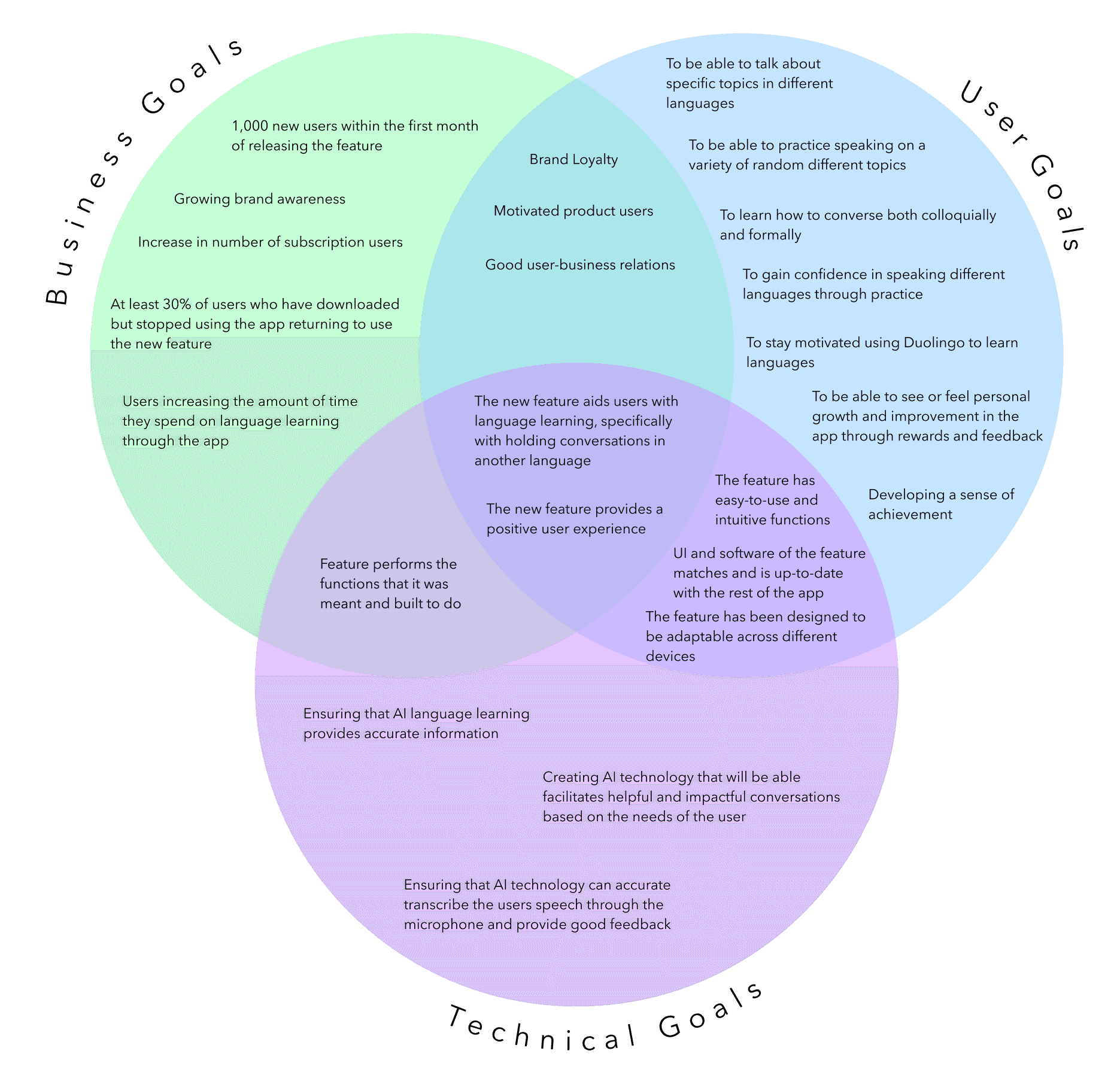
To help me gain clarity of and align the goals of parties involved in the project, I created a Venn Diagram of business, user and technical goals. Using these project goals and the user personas I created, I was able to determine the user needs I wanted to confront and design the elements needed to address them.
POVs and HMWs
With my Venn Diagram and user persona in mind, I was able to determine 2 POV statements and 2 corresponding HMW questions that addressed actionable problems for me to explore with in my design ideas:
POV Statements
I’d like to explore ways to help a Duolingo users to practice using their language skills in conversation because they do not have other opportunities to practice speaking.
I’d like to explore ways to provide feedback to Duolingo users when using the conversation feature because many users feel that they do not know how to improve their speaking skills without it.
HMW Questions
How might we help users practice their conversation skills according to their individual skill levels?
How might we provide feedback to Duolingo users that will effectively help them to improve their conversation skills?
Task Flows
I then created 3 major task flows shown below which would be used in the creation of my user flows and during mid-fidelity and high-fidelity wireframe usability tests:
Key
Enter the “Conversation Feature” and set your skill level to “Current Skill Level”.

Choose a customized topic of conversation for a short conversation practice.

Complete the conversation lesson and receive feedback on the session.

User Flows
Based on my task flows, I created the user flows that would help determine the pages that needed to be built out for my wireframes and to ensure that each task given to users during usability tests would flow smoothly.
Key

Iterations
Below are the highlights of some of the important iterations that were made based on the results of the mid-fidelity usability tests:
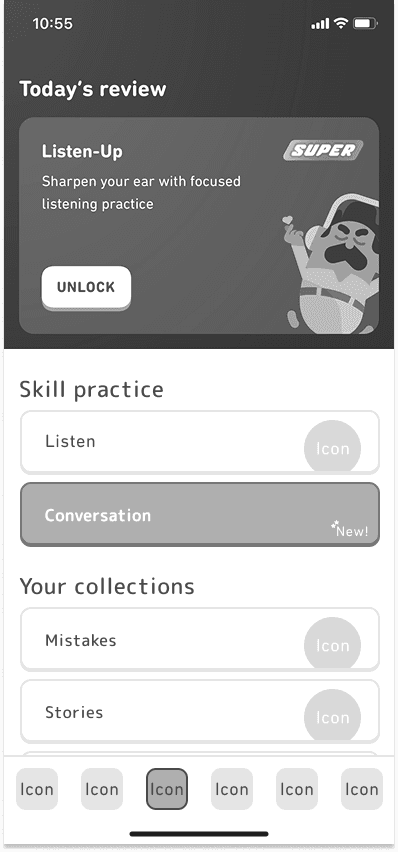
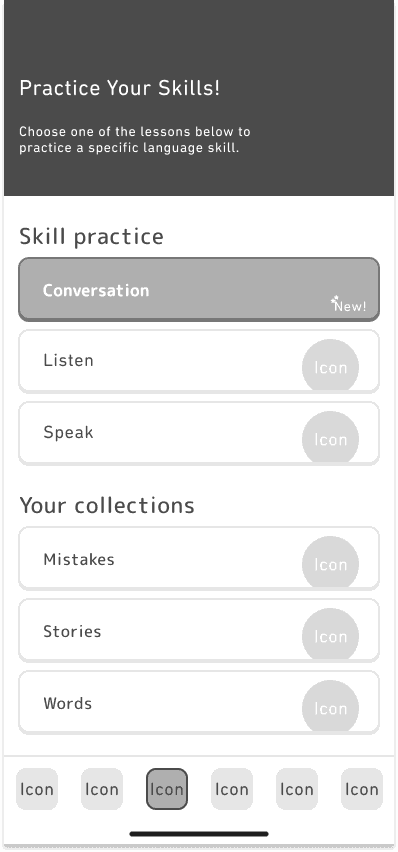
Navigating to the Conversation Feature
Feedback from Usability Tests
The pre-existing “Super Duolingo” ad was removed as it confused users when finding navigating to the feature
The “Conversation” feature was added to the top as a new feature and the speak practice was added to stay consistent with Duolingo’s features.
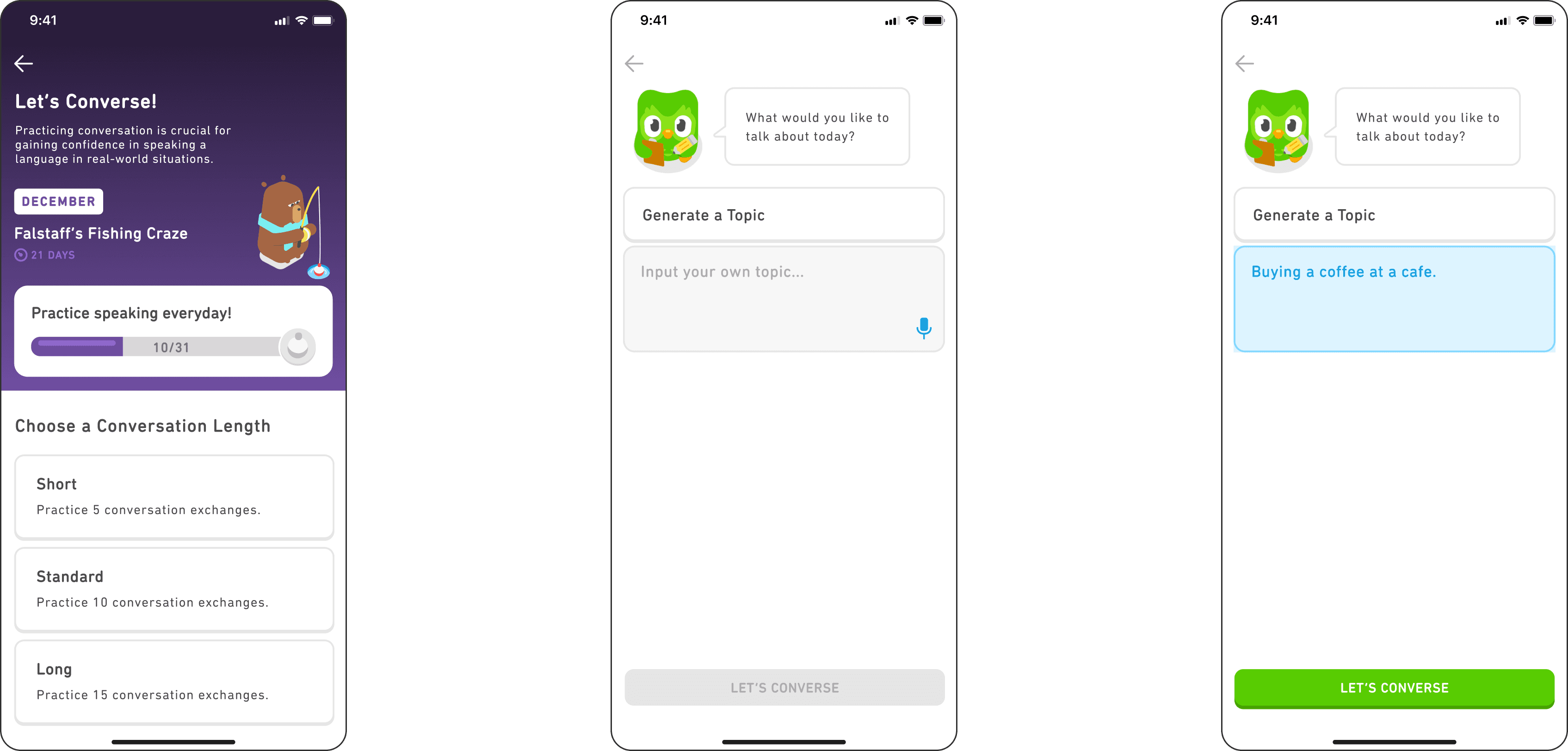
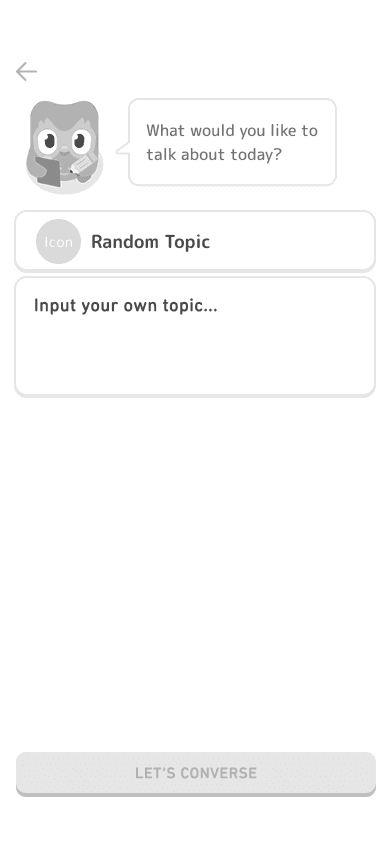
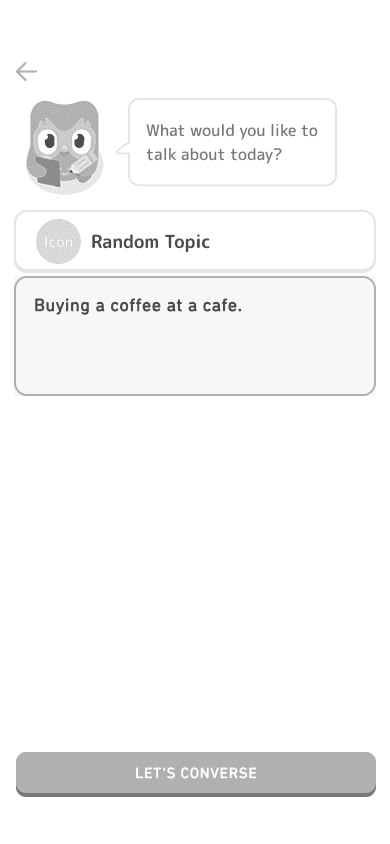
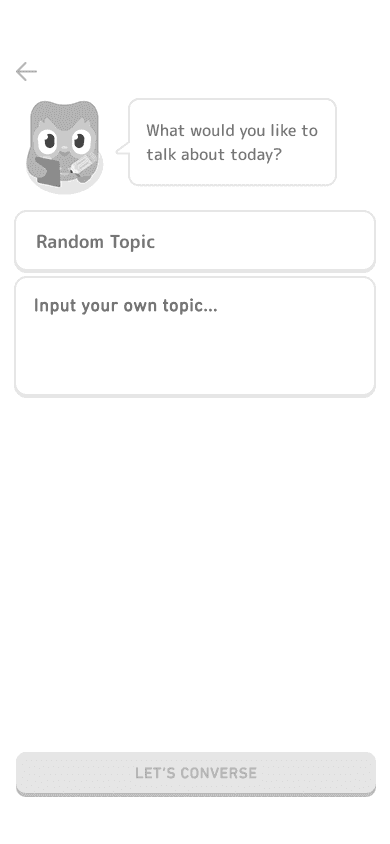
Choosing a Topic
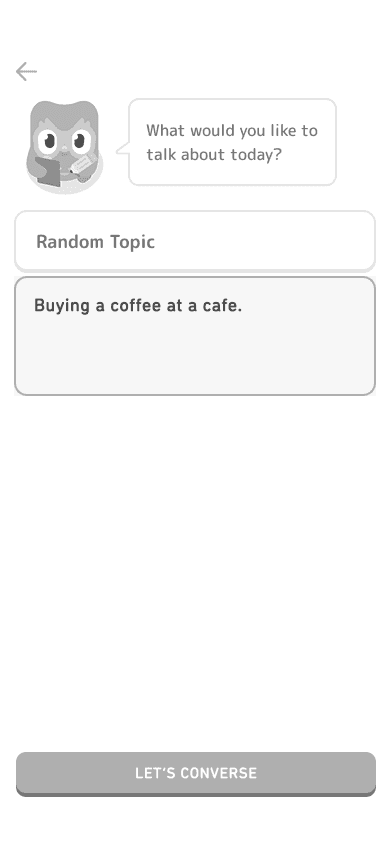
Feedback from Usability Tests
The icon for “Random Topic” was removed to improve consistency between the 2 buttons
The text inside the un-clicked buttons were made lighter to make the difference between chosen vs. unchosen buttons more distinct.
Wireframes
Low-fidelity Wireframes
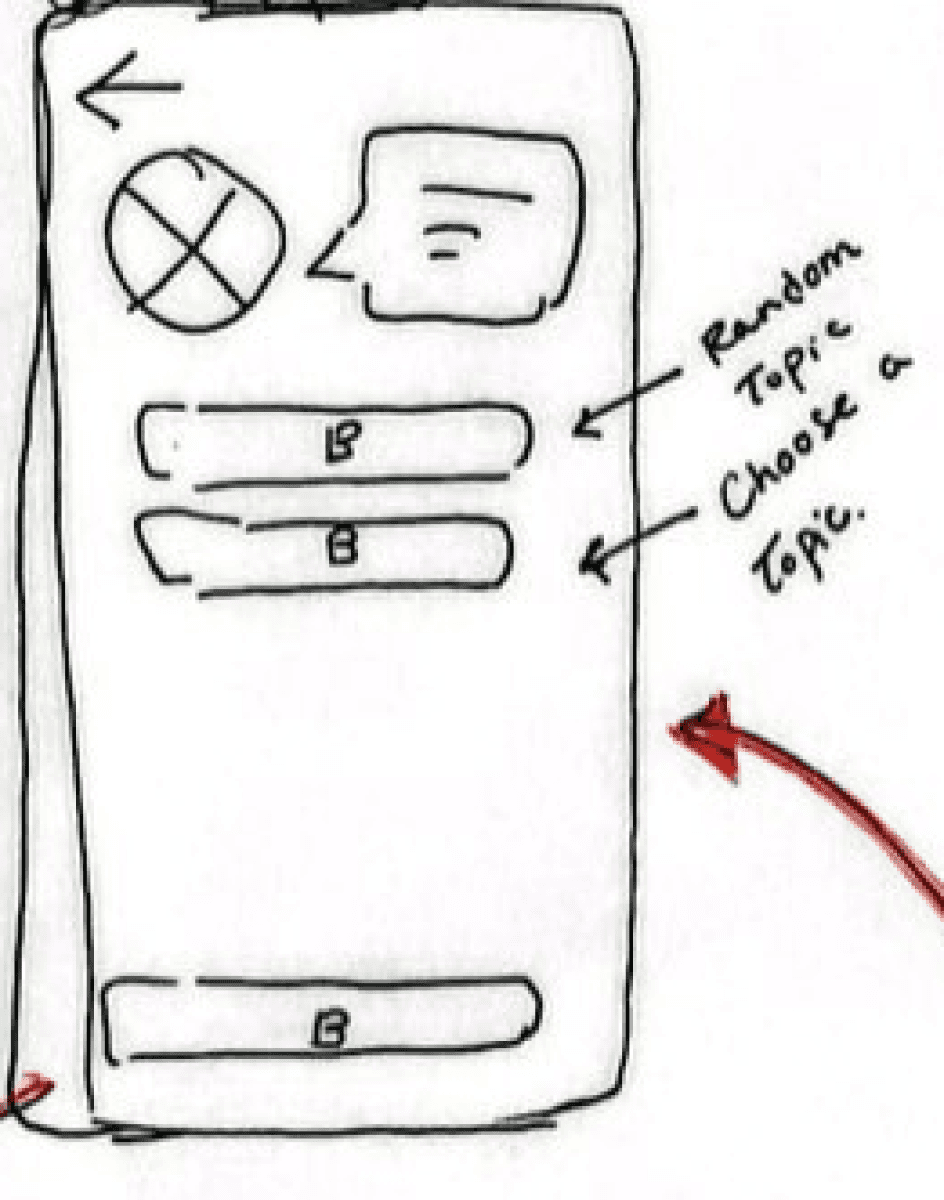
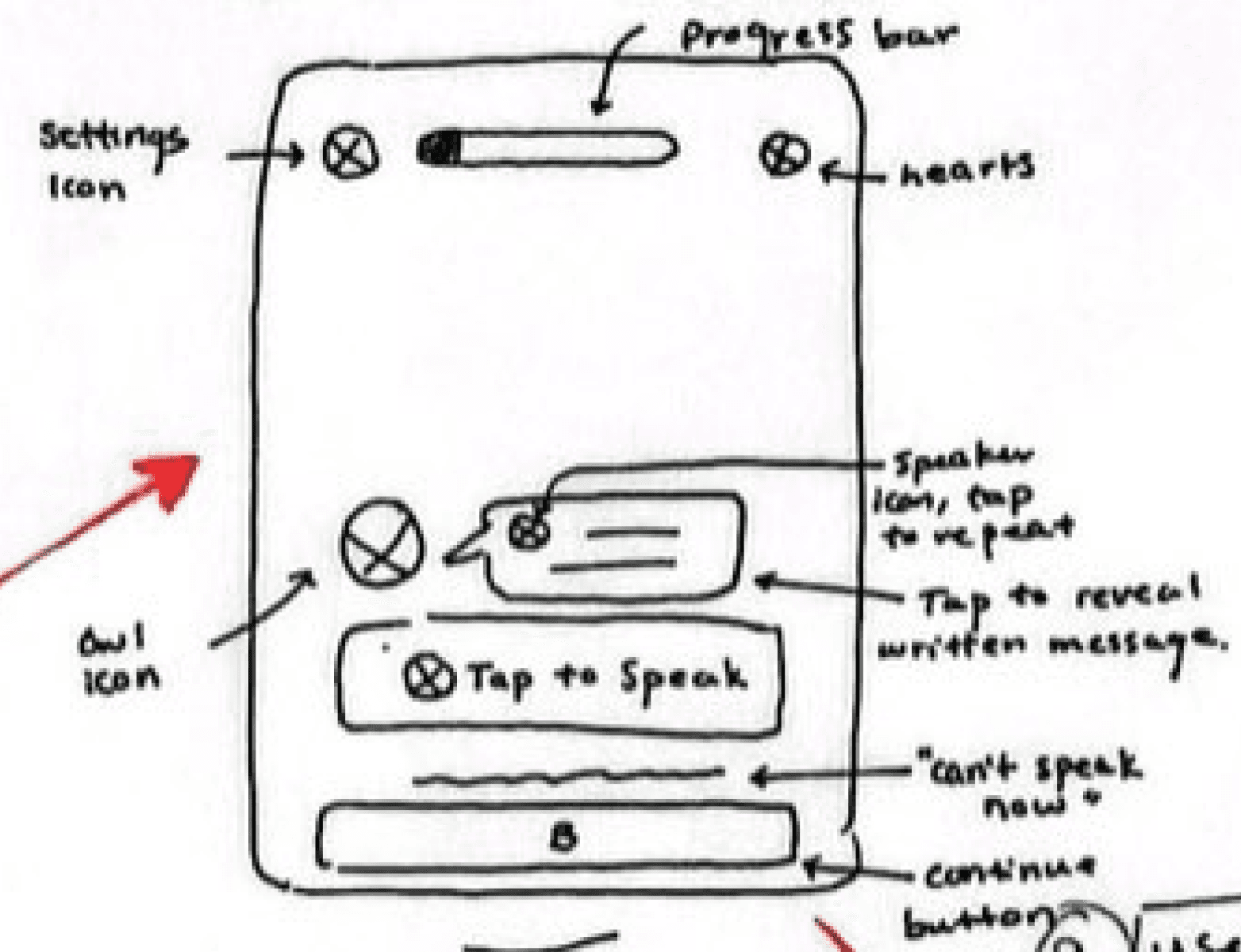
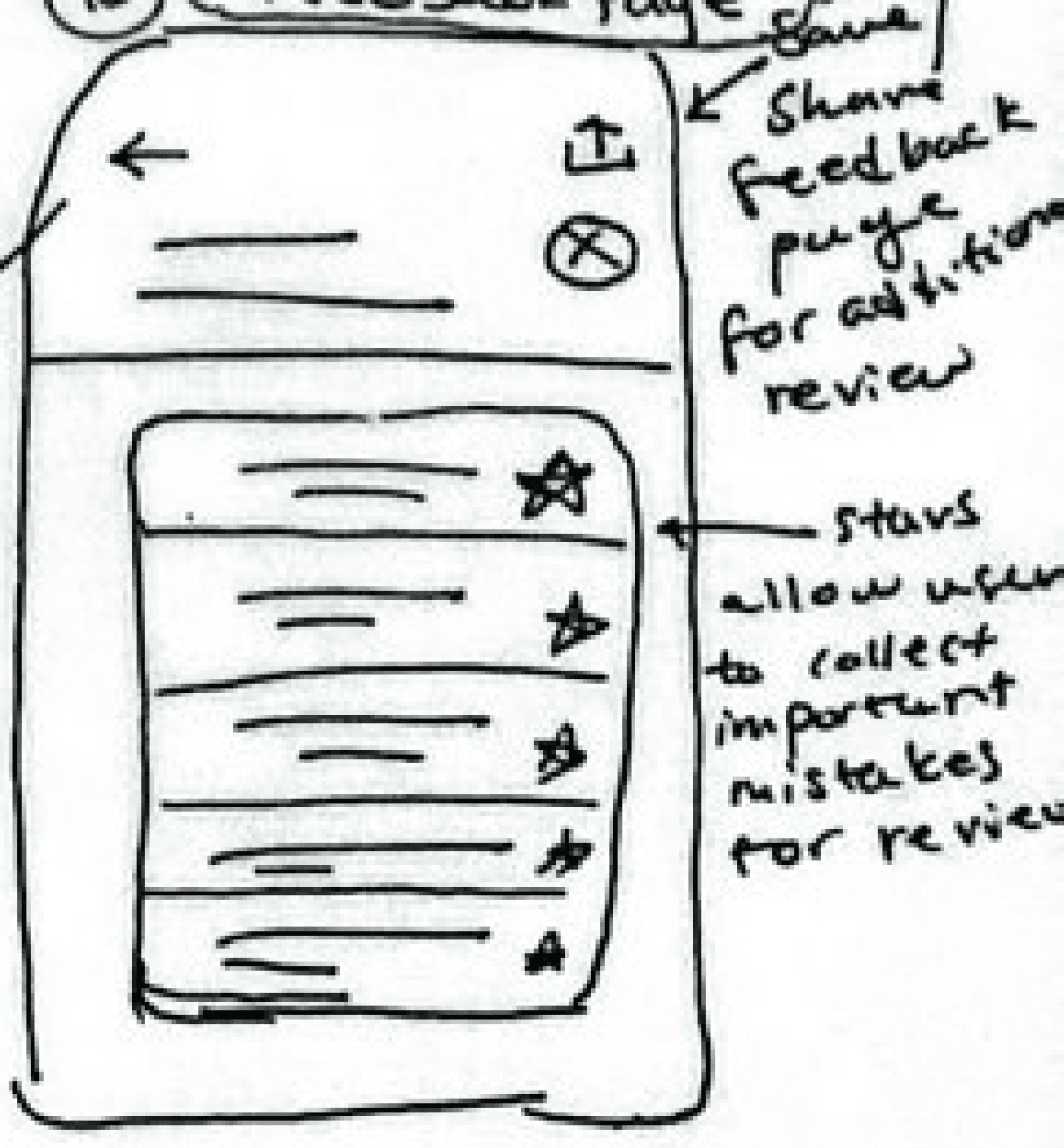
I began by sketching out low-fidelity drafts of task flow pages of my project. I made sure to reference button shapes and draw inspiration from pre-existing Duolingo page layouts to maintain consistency in the existing UI. Here are some of the key screens that I would transition to my mid-fidelity wireframes:
Welcome Page
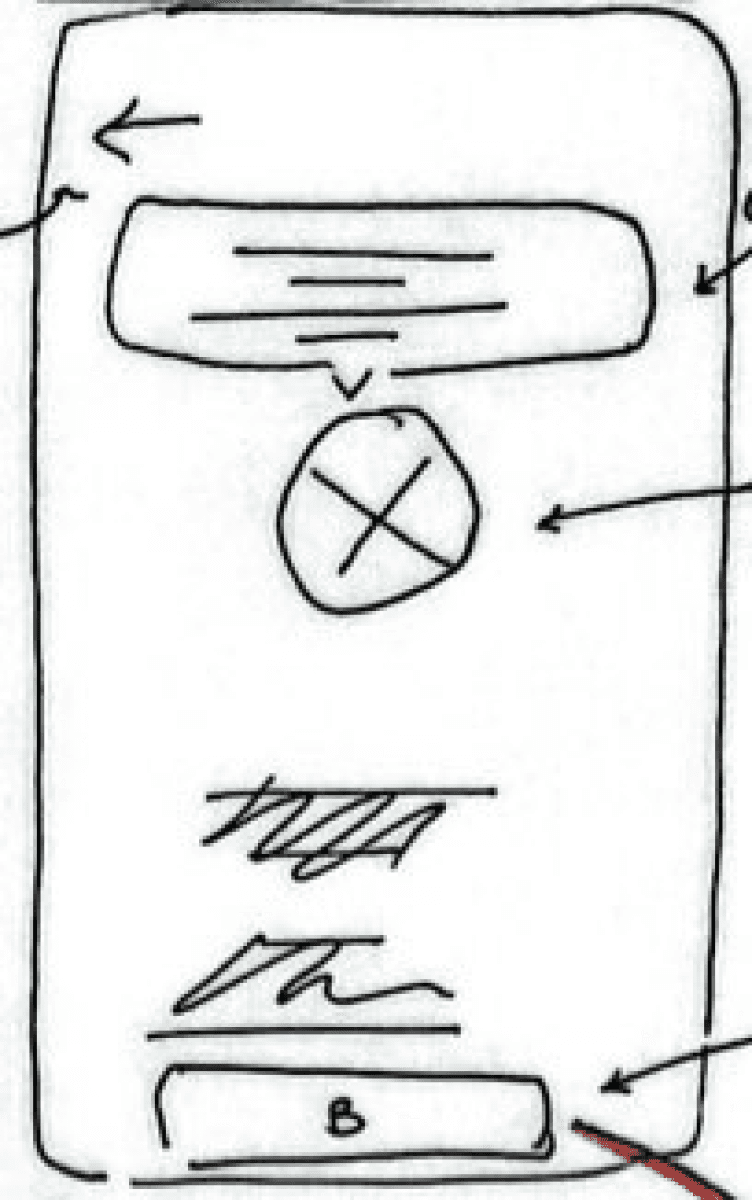
Choosing a Skill Level
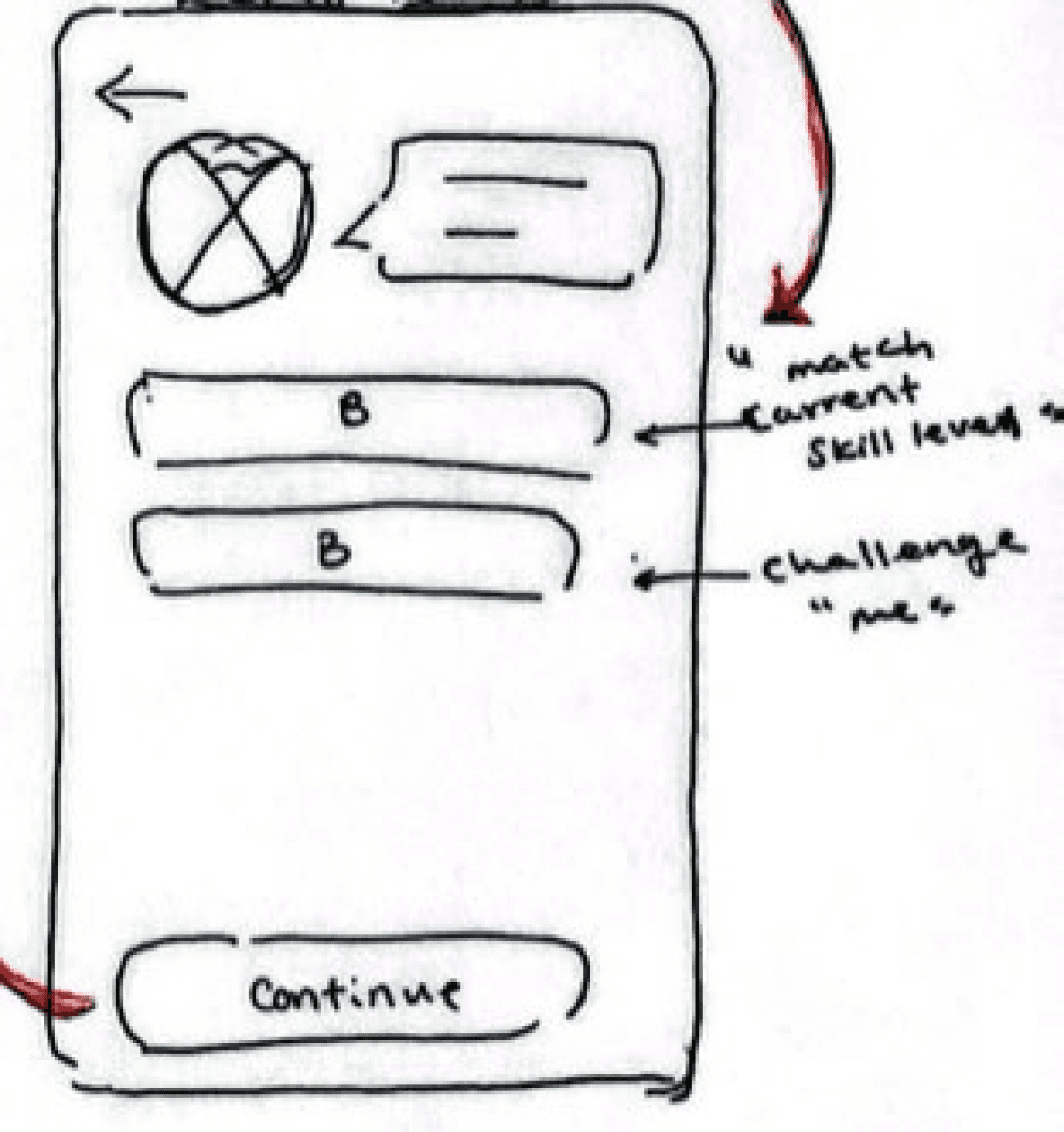
Conversation Feature Page
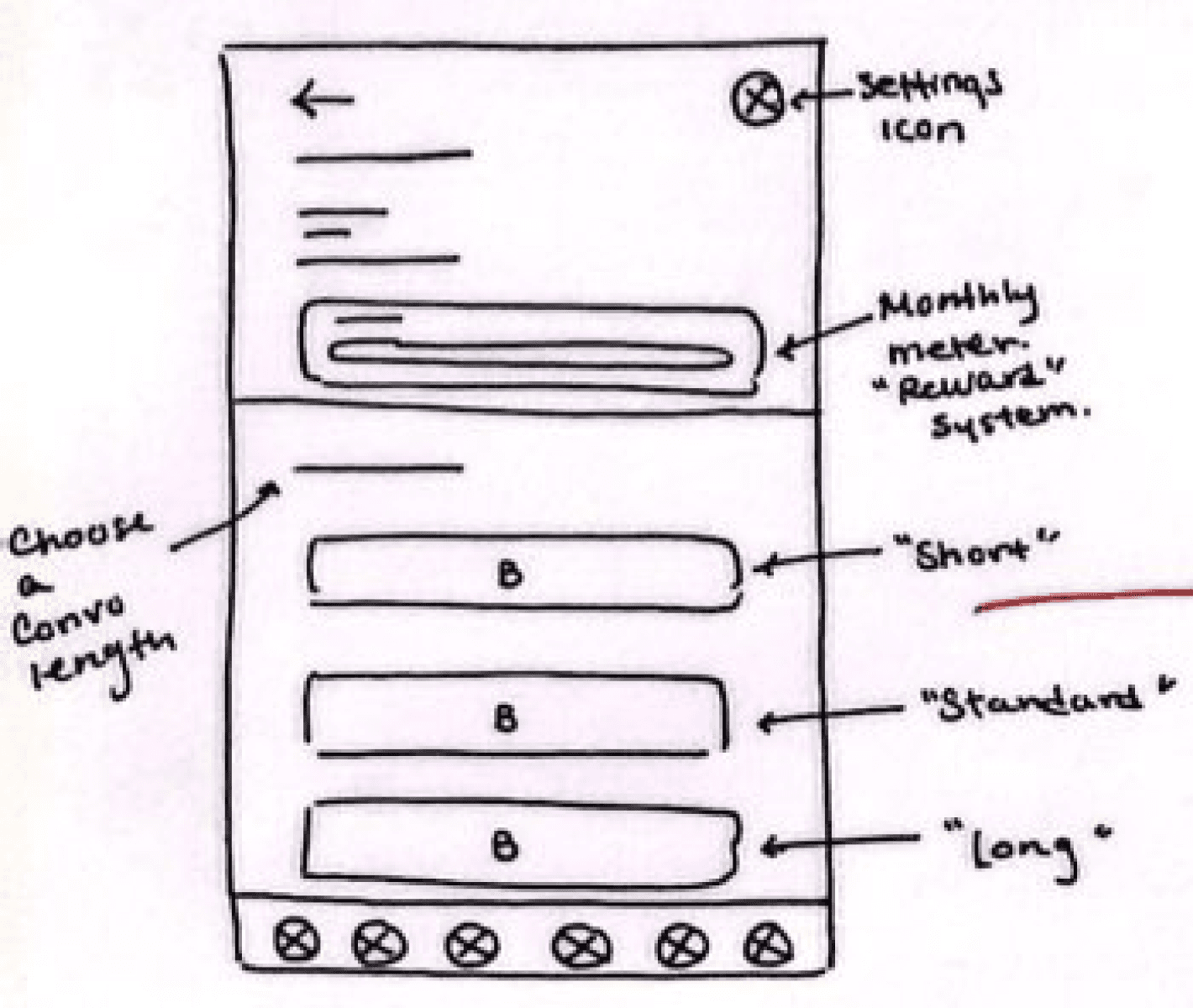
Choosing a Topic
Conversation Session
Feedback Page
Mid-fidelity Wireframes
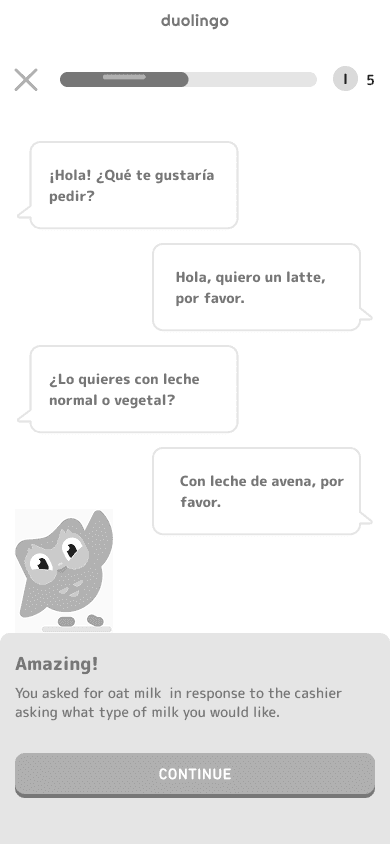
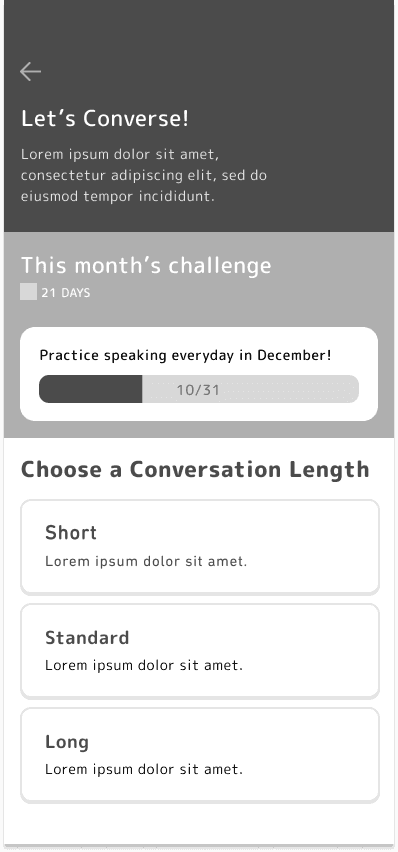
I then chose low-fidelity wireframes that I thought best aligned with the purpose of each page and would be most intuitive to users, and proceeded to create mid-fidelity wireframes of the pages necessary for my task flows.
Here are some of the key pages I created:
Mid-Fidelity Usability Testing
To ensure a seamless app experience, usability tests for my mid-fidelity wireframes were conducted with 4 participants. Participants were asked to perform 3 tasks:
Task 1: Enter the "Conversation" feature and set your skill level
Task 2: Start a short conversation practice on ordering a coffee at a cafe.
Task 3: Complete the conversation, review your mistakes, and complete the session.
Success was measured by the ease of navigation through the app, the ability to complete the task, the time it took for participants to complete the tasks, the number of clicks that strayed from the task flow, and consistency in user behaviors.
Mid-fidelity Usability Test Results:
Most new Duolingo users and some experienced users found it difficult to find the conversation feature on the built-in “Practice” page, mostly because most Duolingo users tend not to use the practice page at all and just follow the happy path on Duolingo’s homepage for complete language lessons. This provided important insights on whether the location of the “Conversation” feature could be changed to make it more visible or if the button leading to the feature could be altered and made more prominent to encourage users to use the feature.
The rest of the tasks were completed by all the participants with general ease and received overall good feedback on the flow and presence of lesson feedback options.
High-Fidelity Wireframes and Usability Test
High-Fidelity Wireframes
Using Duolingo’s brand guidelines found on their website, I transitioned my mid-fidelity wireframes into high-fidelity desktop wireframes, ensuring consistency in the typography, icons, button styles, and brand colors before conducting my high-fidelity usability tests.
Here are some of the key pages from my high-fidelity wireframes:
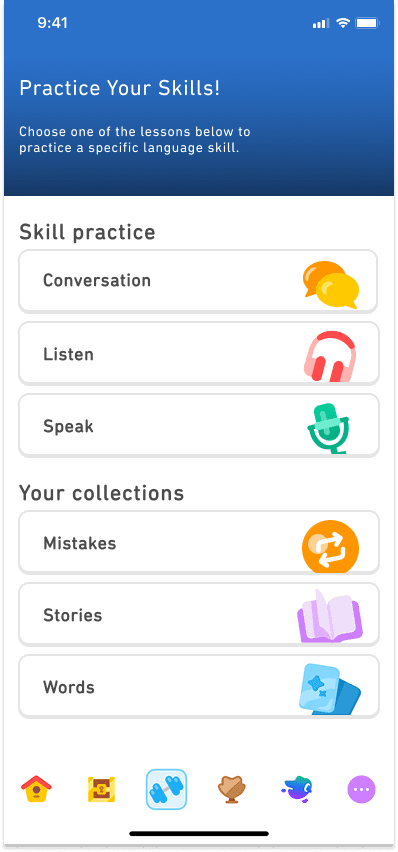
Practice Page
Choosing Skill Level
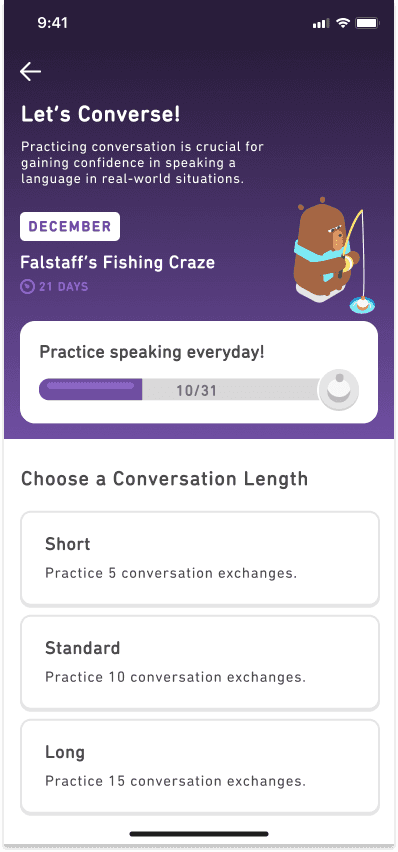
Feature Page
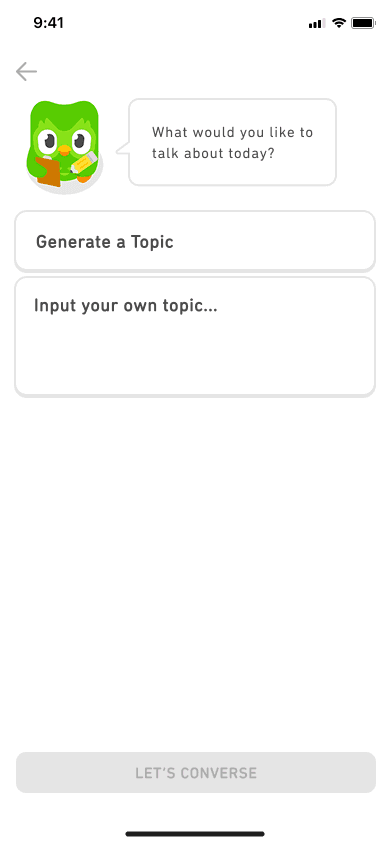
Choosing a Topic
Key Lesson Pages
High-Fidelity Usability Testing
To ensure visibility and legibility of the page stylings, I conducted high-fidelity usability tests of my wireframes with 6 participants tasked with performing the same 3 tasks as in the mid-fidelity usability tests; success of the tasks was measured by the same metrics as well.
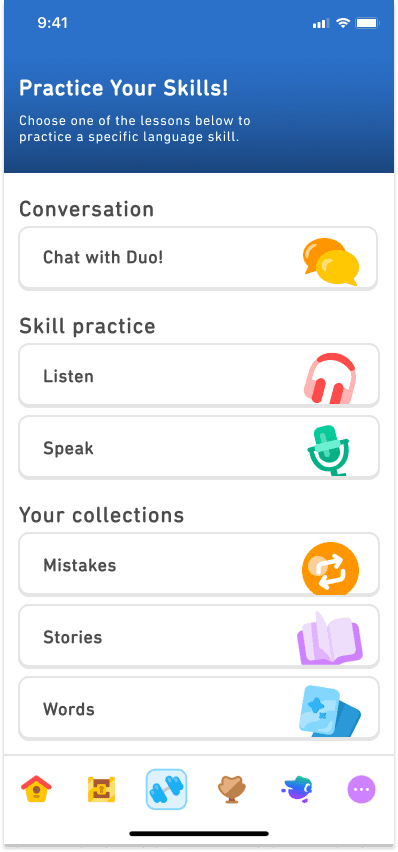
I also conducted an A-B test of the “Practice” page to get feedback on the intuitiveness of 2 page designs due to confusion in the organization and layout of the page during my mid-fidelity usability tests.
Hi-fidelity Usability Test Results
With the iterations from my mid-fidelity test results and the addition of color to my wireframes, I found that most users were able to better navigate through the Duolingo app and find the “Conversation Feature” page. The A-B test of the previous “Practice” page gave me further insights into the layouts of the page and button names that felt more intuitive to users.
The rest of the tasks were completed by all participants with ease and I received positive feedback on the way the lesson was carried out and the ways that feedback was given to users both during and after the lesson.
Iterations
Below are some of the highlights of the iterations I made on my high-fidelity wireframes based on the results of usability test.
A-B Test of the “Practice” Page
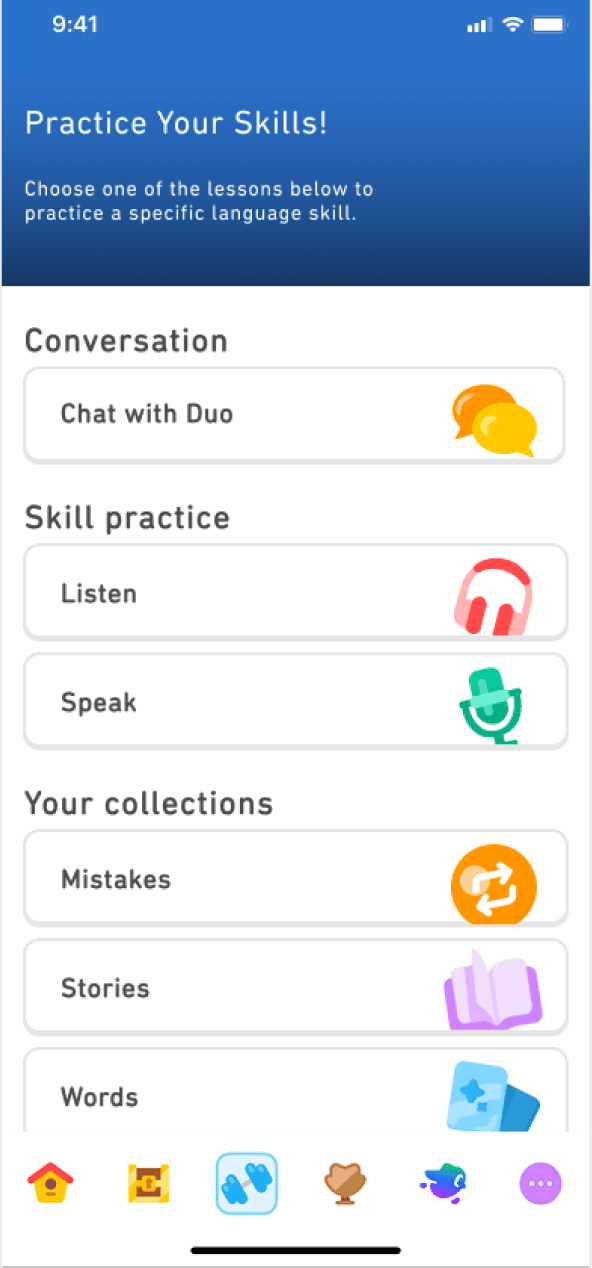
A
B
Feedback from Usability Tests
The A-B test resulted in a majority of users preferring version B of the “Practice” page as they felt the conversation feature name and presence of an independent section helped to differentiate the feature from the pre-existing “Listen” and “Speak” features.
The headline of the “Practice” page was made bold to maintain consistency between pages and to emphasize a different in weight of headline text.
Choosing a Topic of Conversation
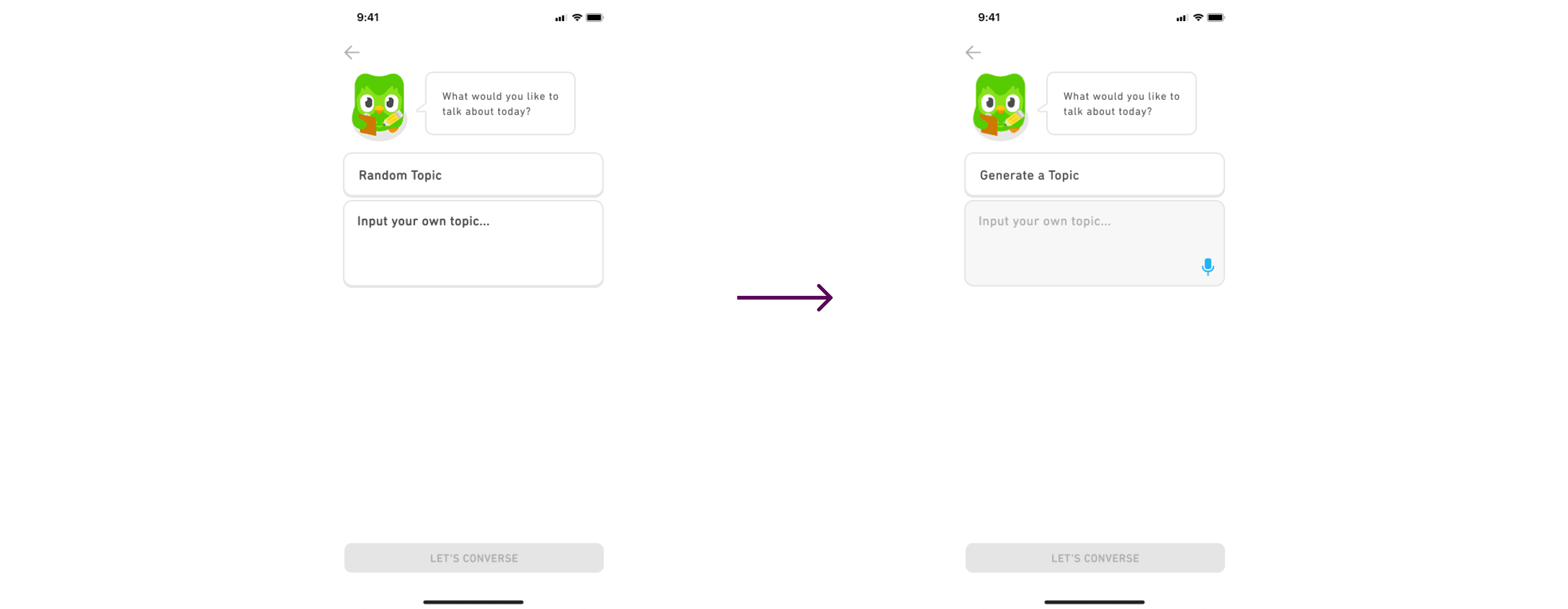
Feedback from Usability Tests
Changing the name of the button “Random Topic” to “Generate a Topic” felt more intuitive to users on what the purpose of the button is.
The text input box was updated to match the current look of Duolingo’s text input boxes for consistency across the app.
Reflection
Designing a conversation feature for the Duolingo mobile app was an extremely enjoyable and rewarding experience where I was able to consider the needs of today’s modern language learner. My goal for this project was to create a personalized and efficient learning experience where users could control their learning path and progress in a way that felt natural, bridging the gap between structured learning and real-world interactions.
One of the key challenges I encountered during this project was Duolingo announcing the release of its conversation feature while I was in the research phase of this project. I initially worried that Duolingo’s new feature would influence my research findings and therefore my entire project. However, I ultimately realized that the release of their own feature further validated the importance and need for language learners to be able to engage conversationally in foreign languages, and that by staying true to my research findings, I was able to design a unique feature that encourages the confidence and engagement of its users.
Next Steps
Refining Conversation Design - Collaboration with linguists and gathering user feedback would help improve response accuracies and variations.
Collaboration with AI and Development Teams - Complex AI technology and algorithms necessary for this feature requires close work with development teams to ensure that the design aligns with technological capabilities.
Exploring Personalizations - Using user tracking and feedback to pinpoint drop-off points, confusion during lessons, and additional needs to improve the feature and adapt to users’ language proficiency levels and preferred learning styles.
Previous Case Study